---
title: Initial Setup
description: Enable email verification to ensure user authenticity and protect application routes.
sidebar:
  order: 20
---

<Prompt
  description="Add required or optional email verification."
  actions={["copy"]}
>
Add SuperTokens email verification to this application. Inspect the existing recipes and determine whether verification should be REQUIRED or OPTIONAL; ask if the business rule is unclear. Configure the backend and frontend EmailVerification and Session recipes consistently, add the required UI routes or custom flow, and verify protected-route behavior. Account for passwordless email behavior and keep delivery credentials in environment variables. Run the relevant tests, typechecks, and build.
</Prompt>

## Overview

Email verification needs to be explicitly configured to work in your **SuperTokens** integration.
The functionality offers two ways to set it up:
- `REQUIRED`: The user needs to verify before they can access any protected routes.
- `OPTIONAL`: The sessions include information about the email verification status, but it is up to you to enforce the requirement based on your business logic.


## Before you start

:::info[Access token guidance]

If you are implementing [**Unified Login**](/authentication/unified-login/introduction) you must manually check the `email_verified` claim on the **OAuth2 Access Tokens**.
Please read the [separate page](/authentication/unified-login/verify-tokens) that shows you how to verify the token.

:::

For passwordless login, with email, a user's email is automatically marked as verified when they login.
Therefore, this flow only triggers if a user changes their email during a session.

## Steps

### 1. Initialize the backend recipe 

<CodeGroup group="backend-language">
<Tab title="Node.js" value="nodejs">
```tsx
import SuperTokens from "supertokens-node";
import EmailVerification from "supertokens-node/recipe/emailverification";
import Session from "supertokens-node/recipe/session";

SuperTokens.init({
  appInfo: {
    apiDomain: "...",
    appName: "...",
    websiteDomain: "...",
  },
  recipeList: [
    EmailVerification.init({
      mode: "REQUIRED", // or "OPTIONAL"
    }),
    Session.init(),
  ],
});
```
</Tab>
<Tab title="Go" value="go">
```go
import (
	"github.com/supertokens/supertokens-golang/recipe/emailverification"
	"github.com/supertokens/supertokens-golang/recipe/emailverification/evmodels"
	"github.com/supertokens/supertokens-golang/recipe/session"
	"github.com/supertokens/supertokens-golang/recipe/session/sessmodels"
	"github.com/supertokens/supertokens-golang/supertokens"
)

func main() {
	supertokens.Init(supertokens.TypeInput{
		RecipeList: []supertokens.Recipe{
			emailverification.Init(evmodels.TypeInput{
				Mode: evmodels.ModeRequired, // or evmodels.ModeOptional
			}),
			session.Init(&sessmodels.TypeInput{}),
		},
	})
}
```
</Tab>
<Tab title="Python" value="python">
```python check=false reason="initialization excerpt omits deployment connection config"
from supertokens_python import init, InputAppInfo
from supertokens_python.recipe import session
from supertokens_python.recipe import emailverification

init(
    app_info=InputAppInfo(
        api_domain="...", app_name="...", website_domain="..."),
    framework='...',  
    recipe_list=[
        emailverification.init(mode='REQUIRED'), # or 'OPTIONAL'
        session.init()
    ]
)
```
</Tab>
</CodeGroup>


<VariantContent storageKey="ui-type" value="prebuilt">

### 2. Initialize the frontend recipe

<UITypeSwitch />

<DependentContent passive group="frontend-prebuilt-ui">
<ContentOption title="Angular" value="angular">
You need to make changes to the auth route configuration, as well as to the `supertokens-web-js` SDK configuration at the root of your application:

This change is in your auth route configuration.
</ContentOption>
</DependentContent>

<CodeGroup group="frontend-prebuilt-ui">
<Tab title="Reactjs" value="reactjs">
<DependentContent group="react-router" label="Do you use react-router-dom?">
<ContentOption title="With React Router" value="yes">
```tsx
import SuperTokens, { SuperTokensWrapper } from "supertokens-auth-react";
import { getSuperTokensRoutesForReactRouterDom } from "supertokens-auth-react/ui";
import EmailVerification from "supertokens-auth-react/recipe/emailverification";
import { EmailVerificationPreBuiltUI } from "supertokens-auth-react/recipe/emailverification/prebuiltui";
import Session from "supertokens-auth-react/recipe/session";
import reactRouterDOM, { Routes, BrowserRouter as Router, Route } from "react-router-dom";

SuperTokens.init({
  appInfo: {
    apiDomain: "...",
    appName: "...",
    websiteDomain: "...",
  },
  recipeList: [
    EmailVerification.init({
      mode: "REQUIRED", // or "OPTIONAL"
    }),
    Session.init(),
  ],
});

function App() {
  return (
    <SuperTokensWrapper>
      <div className="App">
        <Router>
          <div className="fill">
            <Routes>
              {getSuperTokensRoutesForReactRouterDom(reactRouterDOM, [
                /* Other pre-built UI */ EmailVerificationPreBuiltUI,
              ])}
              // ... other routes
            </Routes>
          </div>
        </Router>
      </div>
    </SuperTokensWrapper>
  );
}
```
</ContentOption>
<ContentOption title="Without React Router" value="no">
```tsx
import SuperTokens, { SuperTokensWrapper } from "supertokens-auth-react";
import { canHandleRoute, getRoutingComponent } from "supertokens-auth-react/ui";
import EmailVerification from "supertokens-auth-react/recipe/emailverification";
import { EmailVerificationPreBuiltUI } from "supertokens-auth-react/recipe/emailverification/prebuiltui";
import Session from "supertokens-auth-react/recipe/session";

SuperTokens.init({
  appInfo: {
    apiDomain: "...",
    appName: "...",
    websiteDomain: "...",
  },
  recipeList: [
    EmailVerification.init({
      mode: "REQUIRED", // or "OPTIONAL"
    }),
    Session.init(),
  ],
});

function App() {
  if (canHandleRoute([/* Other pre-built UI */ EmailVerificationPreBuiltUI])) {
    return getRoutingComponent([/* Other pre-built UI */ EmailVerificationPreBuiltUI]);
  }
  return <SuperTokensWrapper>{/*Your app*/}</SuperTokensWrapper>;
}
```
</ContentOption>
</DependentContent>
</Tab>
<Tab title="Angular" value="angular">
```tsx check=false reason="script-tag example relies on globals provided by loaded SuperTokens bundles"
// this goes in the auth route config of your frontend app (once the pre-built UI script has been loaded)

supertokensUIInit("supertokensui", {
  appInfo: {
    apiDomain: "...",
    appName: "...",
    websiteDomain: "...",
  },
  recipeList: [
    supertokensUIEmailVerification.init({
      mode: "REQUIRED", // or "OPTIONAL"
    }),
  ],
});
```
</Tab>
</CodeGroup>

<DependentContent passive group="frontend-prebuilt-ui">
<ContentOption title="Angular" value="angular">
This change goes in the `supertokens-web-js` SDK configuration at the root of your application:
</ContentOption>
</DependentContent>

<CodeGroup passive group="frontend-prebuilt-ui">
<Tab title="Angular" value="angular">
```tsx
import SuperTokens from "supertokens-web-js";
import EmailVerification from "supertokens-web-js/recipe/emailverification";
import Session from "supertokens-web-js/recipe/session";

SuperTokens.init({
  appInfo: {
    apiDomain: "...",
    appName: "...",
  },
  recipeList: [EmailVerification.init(), Session.init()],
});
```
</Tab>
</CodeGroup>

:::note[SuperTokens triggers verification emails by redirecting the user to the email verification path when the mode is `REQUIRED`.]
If you have set the mode to `OPTIONAL` or are **NOT** using the `SessionAuth` wrapper, you need to manually trigger the verification email.
The guide on [protecting API and website routes](./protecting-routes) covers the changes that you need to make. 

Additionally, note that SuperTokens does not send verification emails post user sign up.
Redirect the user to the email verification path to trigger the sending of the verification email.
This happens automatically when using the prebuilt UI and in `REQUIRED` mode. 
:::

</VariantContent>

<VariantContent storageKey="ui-type" value="custom">


### 2. Initialize the frontend recipe

<UITypeSwitch />


<DependentContent passive group="frontend-custom-ui">
<ContentOption title="Mobile" value="mobile">
:::success[No specific action required here.]
:::
</ContentOption>
</DependentContent>

<CodeGroup group="frontend-custom-ui">
<Tab title="Web" value="web">
<DependentContent group="install-method" label="Installation method">
<ContentOption title="npm" value="npm">
```tsx
import SuperTokens from "supertokens-web-js";
import EmailVerification from "supertokens-web-js/recipe/emailverification";
import Session from "supertokens-web-js/recipe/session";

SuperTokens.init({
  appInfo: {
    apiDomain: "...",
    appName: "...",
  },
  recipeList: [EmailVerification.init(), Session.init()],
});
```
</ContentOption>
</DependentContent>
</Tab>
<Tab title="Mobile" value="mobile">

</Tab>
</CodeGroup>

### 3. Send the email verification email

After a user signs up, or when the email verification validators fail, you need to tell the user about the email verification process.
Redirect them to a screen that informs them about the current status and call the verification API.


<DependentContent passive group="frontend-custom-ui">
<ContentOption title="Mobile" value="mobile">
Create a new screen on your app that asks the user to enter their email to receive an email. This screen should ideally link to the sign in form.
Once the user has entered their email, you can call the following API to send an email verification email to that user:
</ContentOption>
</DependentContent>

<CodeGroup group="frontend-custom-ui">
<Tab title="Web" value="web">
<DependentContent group="install-method" label="Installation method">
<ContentOption title="npm" value="npm">
```tsx
import { sendVerificationEmail } from "supertokens-web-js/recipe/emailverification";

async function sendEmail() {
  try {
    let response = await sendVerificationEmail();
    if (response.status === "EMAIL_ALREADY_VERIFIED_ERROR") {
      // This can happen if the info about email verification in the session was outdated.
      // Redirect the user to the home page
      window.location.assign("/home");
    } else {
      // email was sent successfully.
      window.alert("Please check your email and click the link in it");
    }
  } catch (err: any) {
    if (err.isSuperTokensGeneralError === true) {
      // this may be a custom error message sent from the API by you.
      window.alert(err.message);
    } else {
      window.alert("Oops! Something went wrong.");
    }
  }
}
```
</ContentOption>
</DependentContent>
</Tab>
<Tab title="Mobile" value="mobile">
```bash
curl --location --request POST '<YOUR_API_DOMAIN>/auth/user/email/verify/token' \
--header 'Authorization: Bearer ...'
```
</Tab>
</CodeGroup>

<DependentContent passive group="frontend-custom-ui">
<ContentOption title="Mobile" value="mobile">
The response body from the API call has a `status` property in it:

- `status: "OK"`: An email was successfully sent to the user.
- `status: "EMAIL_ALREADY_VERIFIED_ERROR"`: This status can return if the info about email verification in the session was outdated. Redirect the user to the home page.
- `status: "GENERAL_ERROR"`: This is only possible if you have overridden the backend API to send back a custom error message which should display on the frontend.

:::info[Multi Tenancy]

You do not need to add the tenant ID to the path here because the backend fetches the `tenantId` of the user from the session token.

:::
</ContentOption>
</DependentContent>


:::note[The API for sending an email verification email requires an active session. If you are using the frontend SDKs, then the session tokens should automatically get attached to the request.]
:::

#### Change the email verification link 

By default, the email verification link points to the `websiteDomain` configured on the backend.
That would be the `/auth/verify-email` route if `/auth` is the value of `websiteBasePath`.
If you want to change this to something different, follow the next example:

<CodeGroup group="backend-language">
<Tab title="Node.js" value="nodejs">
```tsx
import SuperTokens from "supertokens-node";
import EmailVerification from "supertokens-node/recipe/emailverification";

SuperTokens.init({
  supertokens: {
    connectionURI: "...",
  },
  appInfo: {
    apiDomain: "...",
    appName: "...",
    websiteDomain: "...",
  },
  recipeList: [
    EmailVerification.init({
      mode: "OPTIONAL",
      emailDelivery: {
        override: (originalImplementation) => {
          return {
            ...originalImplementation,
            sendEmail(input) {
              return originalImplementation.sendEmail({
                ...input,
                emailVerifyLink: input.emailVerifyLink.replace(
                  // This is: `<YOUR_WEBSITE_DOMAIN>/auth/verify-email`
                  "http://localhost:3000/auth/verify-email",
                  "http://localhost:3000/your/path",
                ),
              });
            },
          };
        },
      },
    }),
  ],
});
```
</Tab>
<Tab title="Go" value="go">
```go
import (
	"strings"

	"github.com/supertokens/supertokens-golang/ingredients/emaildelivery"
	"github.com/supertokens/supertokens-golang/recipe/emailverification"
	"github.com/supertokens/supertokens-golang/recipe/emailverification/evmodels"
	"github.com/supertokens/supertokens-golang/supertokens"
)

func main() {
	supertokens.Init(supertokens.TypeInput{
		RecipeList: []supertokens.Recipe{
			emailverification.Init(evmodels.TypeInput{
				Mode: evmodels.ModeOptional,
				EmailDelivery: &emaildelivery.TypeInput{
					Override: func(originalImplementation emaildelivery.EmailDeliveryInterface) emaildelivery.EmailDeliveryInterface {
						ogSendEmail := *originalImplementation.SendEmail

						(*originalImplementation.SendEmail) = func(input emaildelivery.EmailType, userContext supertokens.UserContext) error {
							// This is: `<YOUR_WEBSITE_DOMAIN>/auth/verify-email`
							input.EmailVerification.EmailVerifyLink = strings.Replace(
								input.EmailVerification.EmailVerifyLink,
								"http://localhost:3000/auth/verify-email",
								"http://localhost:3000/your/path", 1,
							)
							return ogSendEmail(input, userContext)
						}
						return originalImplementation
					},
				},
			}),
		},
	})
}
```
</Tab>
<Tab title="Python" value="python">
```python check=false reason="initialization excerpt omits deployment connection config"
from supertokens_python import init, InputAppInfo
from supertokens_python.recipe import emailverification
from supertokens_python.ingredients.emaildelivery.types import EmailDeliveryConfig
from supertokens_python.recipe.emailverification.types import EmailDeliveryOverrideInput, EmailTemplateVars
from typing import Dict, Any


def custom_email_delivery(original_implementation: EmailDeliveryOverrideInput) -> EmailDeliveryOverrideInput:
    original_send_email = original_implementation.send_email

    async def send_email(template_vars: EmailTemplateVars, user_context: Dict[str, Any]) -> None:

        # This is: `<YOUR_WEBSITE_DOMAIN>/auth/verify-email`
        template_vars.email_verify_link = template_vars.email_verify_link.replace(
            "http://localhost:3000/auth/verify-email", "http://localhost:3000/your/path")

        return await original_send_email(template_vars, user_context)

    original_implementation.send_email = send_email
    return original_implementation


init(
    app_info=InputAppInfo(
        api_domain="...", app_name="...", website_domain="..."),
    framework='...',  
    recipe_list=[
        emailverification.init(
            mode="OPTIONAL",
            email_delivery=EmailDeliveryConfig(override=custom_email_delivery))
    ]
)
```
</Tab>
</CodeGroup>

:::info[Multi Tenancy]

For a multi tenant setup, the input to the `sendEmail` function also contains the `tenantId`. You can use this to determine the correct value to set for the `websiteDomain` in the generated link. 

:::

### 4. Verify the email after the user clicks the link

Once the user clicks the email verification link, and it opens your app, call the following function.
It extracts the token and `tenantId` (if you use a multi tenant setup) from the link and calls the token verification API.


<DependentContent passive group="frontend-custom-ui">
<ContentOption title="Mobile" value="mobile">
When the user clicks the email verification link, and it opens as a deep link into your mobile app, you can remove the token and call the verification API.
</ContentOption>
</DependentContent>

<CodeGroup group="frontend-custom-ui">
<Tab title="Web" value="web">
<DependentContent group="install-method" label="Installation method">
<ContentOption title="npm" value="npm">
```tsx
import { verifyEmail } from "supertokens-web-js/recipe/emailverification";

async function consumeVerificationCode() {
  try {
    let response = await verifyEmail();
    if (response.status === "EMAIL_VERIFICATION_INVALID_TOKEN_ERROR") {
      // This can happen if the verification code is expired or invalid.
      // You should ask the user to retry
      window.alert("Oops! Seems like the verification link expired. Please try again");
      window.location.assign("/auth/verify-email"); // back to the email sending screen.
    } else {
      // email was verified successfully.
      window.location.assign("/home");
    }
  } catch (err: any) {
    if (err.isSuperTokensGeneralError === true) {
      // this may be a custom error message sent from the API by you.
      window.alert(err.message);
    } else {
      window.alert("Oops! Something went wrong.");
    }
  }
}
```
</ContentOption>
</DependentContent>
</Tab>
<Tab title="Mobile" value="mobile">
</Tab>
</CodeGroup>

<DependentContent passive group="frontend-custom-ui">
<ContentOption title="Mobile" value="mobile">
<ApiRequestSnippet
  operationId="verifyEmail"
  source="fdi"
  path={{ tenantId: "public" }}
  body={{
    method: "token",
    token: "ZTRiOTBjNz...jI5MTZlODkxw",
  }}
/>

:::info[Multi Tenancy]

For a multitenant setup, read the tenant ID from the email verification link's `tenantId` query parameter and replace
`public` in the request path. The public tenant also supports omitting the `/public` path segment.

:::

The response body from the API call has a `status` property in it:

- `status: "OK"`: Email verification was successful.
- `status: "EMAIL_VERIFICATION_INVALID_TOKEN_ERROR"`: This can happen if the verification code expires or is invalid. You should ask the user to retry.
- `status: "GENERAL_ERROR"`: This is only possible if you have overridden the backend API to send back a custom error message which should display on the frontend.
</ContentOption>
</DependentContent>


:::warning[- This API doesn't require an active session to succeed.]
- If you are calling the above API on page load, there is an edge case in which email clients might open the verification link in the email (for scanning purposes) and consume the token in the URL. This would lead to issues in which an attacker could sign up using someone else’s email and end up with a verified status!

    To prevent this, on page load, you should check if a session exists, and if it does, only then call the above API. If a session does not exist, you should first show a button, which when clicked would call the above API (email clients do not automatically click on this button). The button text could be something like "Click here to verify your email". 
:::


</VariantContent>


## References

### Verification email

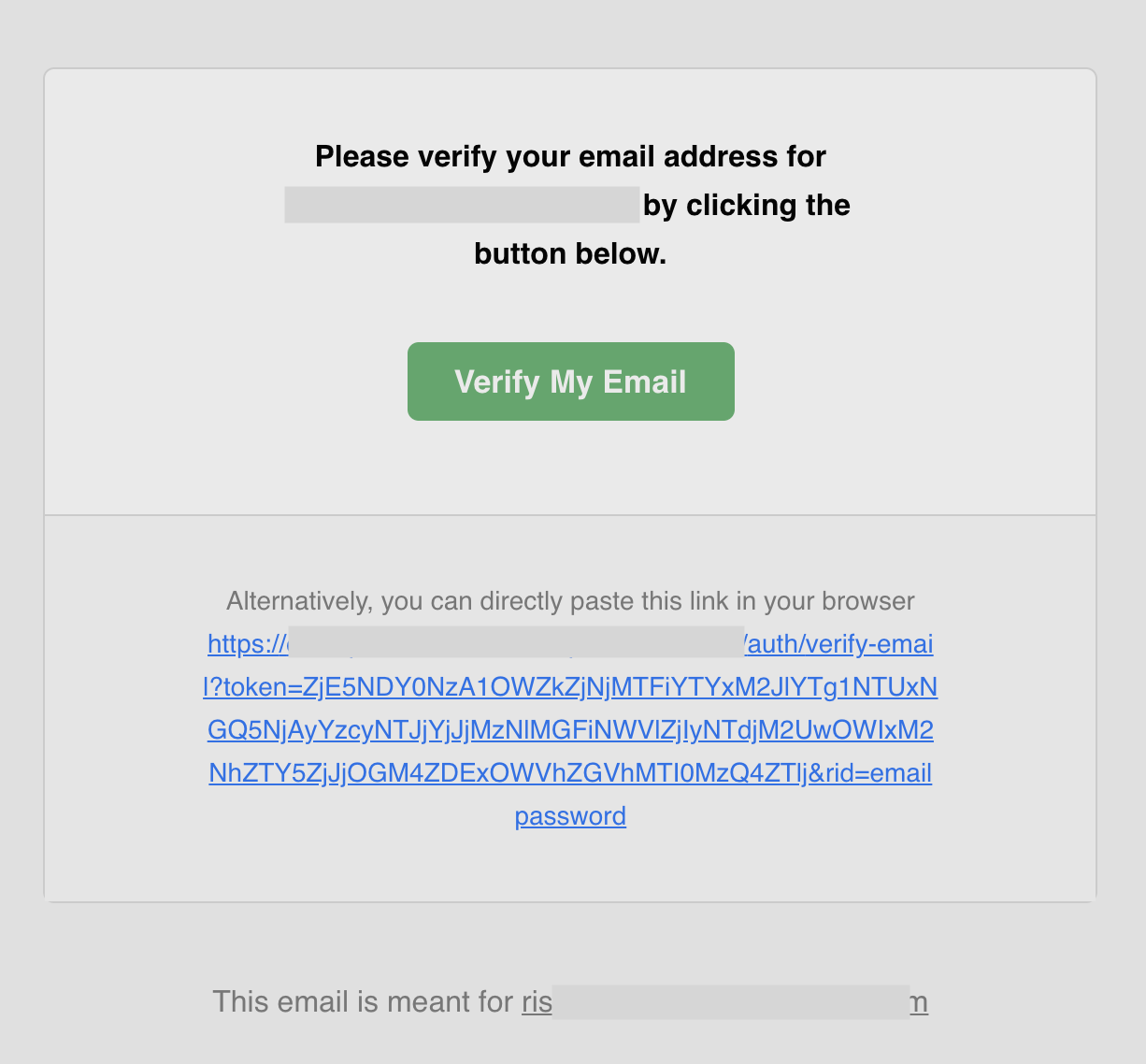
This is how the email that the user receives looks like:

<img alt="UI of the verification email sent to the registered user" width="450px" src="/docs-assets/img/emailpassword/email-verify-email.png" />

You can find the [source code of this template on GitHub](https://github.com/supertokens/email-sms-templates/blob/master/email-html/email-verification.html)
To understand more about how you can customize it, check the [email delivery](/platform-configuration/email-delivery) section.

### Verification link lifetime

By default, the email verification link's lifetime is **1 day**.
This can change via the Core configuration (time in milliseconds):

<DependentContent passive group="core-hosting">
<ContentOption title="Managed service" value="managed">
- Go to the [SuperTokens SaaS dashboard](https://supertokens.com/dashboard) and select the relevant **Managed** deployment.
      - Open **Configuration** and find the **Email Verification** configuration card.
    - Change the `email_verification_token_lifetime` value. Configuration changes are saved automatically.
</ContentOption>
</DependentContent>

<CodeGroup group="core-hosting">
<Tab title="Managed service" value="managed">

</Tab>
<Tab title="Self-hosted with Docker" value="self-hosted-docker">
```bash
# Here we set the lifetime to 2 hours.

docker run \
    -p 3567:3567 \
    -e EMAIL_VERIFICATION_TOKEN_LIFETIME=7200000 \
    -d supertokens/supertokens-<db_name>
```
</Tab>
<Tab title="Self-hosted without Docker" value="self-hosted-binary">
```yaml
# You need to add the following to the config.yaml file.
# The file path can be found by running the "supertokens --help" command

email_verification_token_lifetime: 7200000
```
</Tab>
</CodeGroup>


## Next steps


<CardGroup cols={3}>
<Card title="Manual Actions#Mark The Email As Verified" href="/additional-verification/email-verification/manual-actions#mark-the-email-as-verified">

</Card>
<Card title="Manual Actions" href="/additional-verification/email-verification/manual-actions">

</Card>
<Card title="Protecting Routes" href="/additional-verification/email-verification/protecting-routes">

</Card>
<Card title="Hooks And Overrides#Backend Override" href="/additional-verification/email-verification/hooks-and-overrides#backend-override">

</Card>
<Card title="Email Delivery" href="/platform-configuration/email-delivery">

</Card>
<Card title="Claim Validation" href="/additional-verification/session-verification/claim-validation">

</Card>
</CardGroup>
