Tenant actions
Discover different APIs that can help you work with tenants.
Create a new tenant
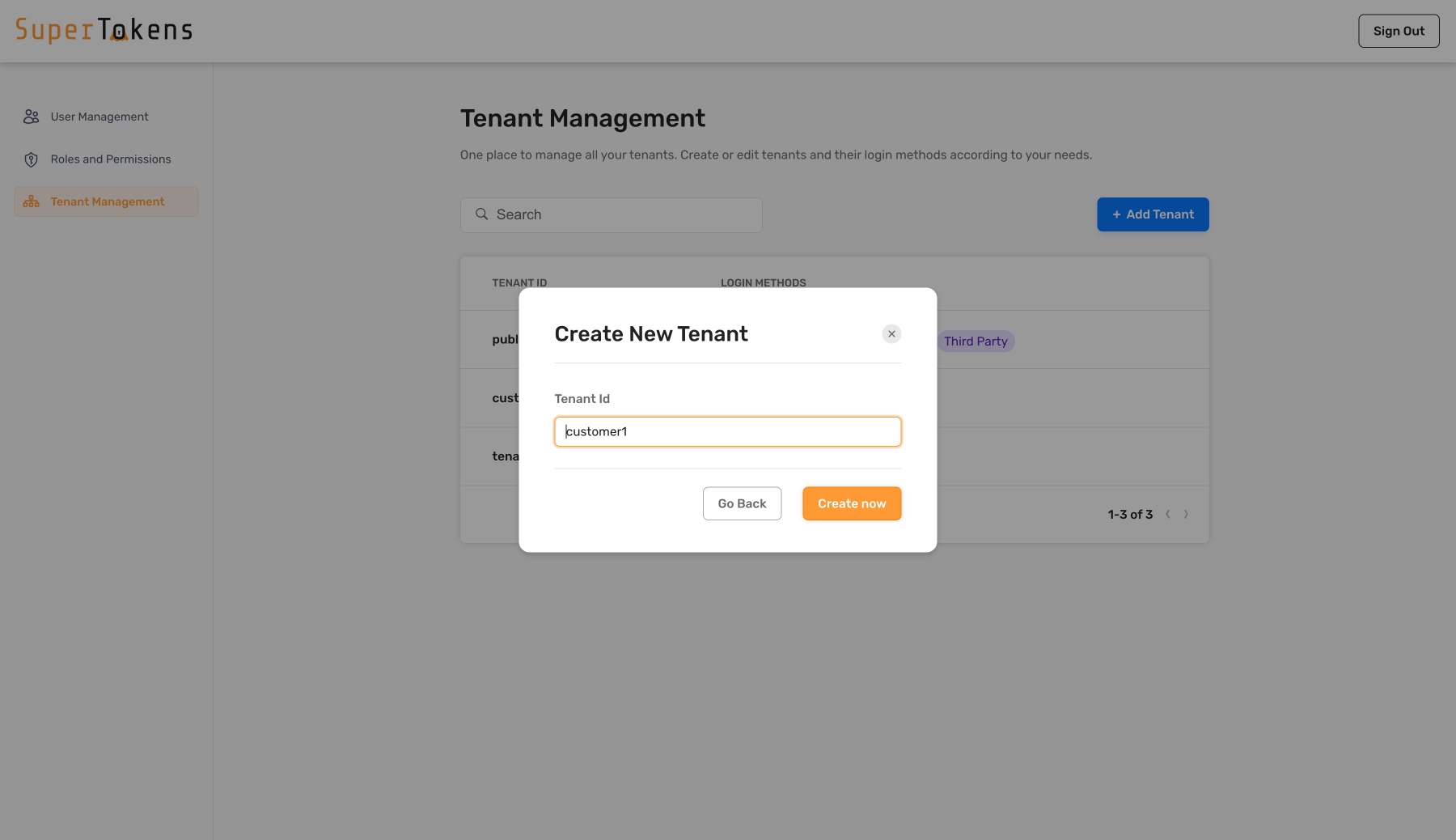
Create a new tenant by clicking on the Add Tenant button and specify the tenant ID.
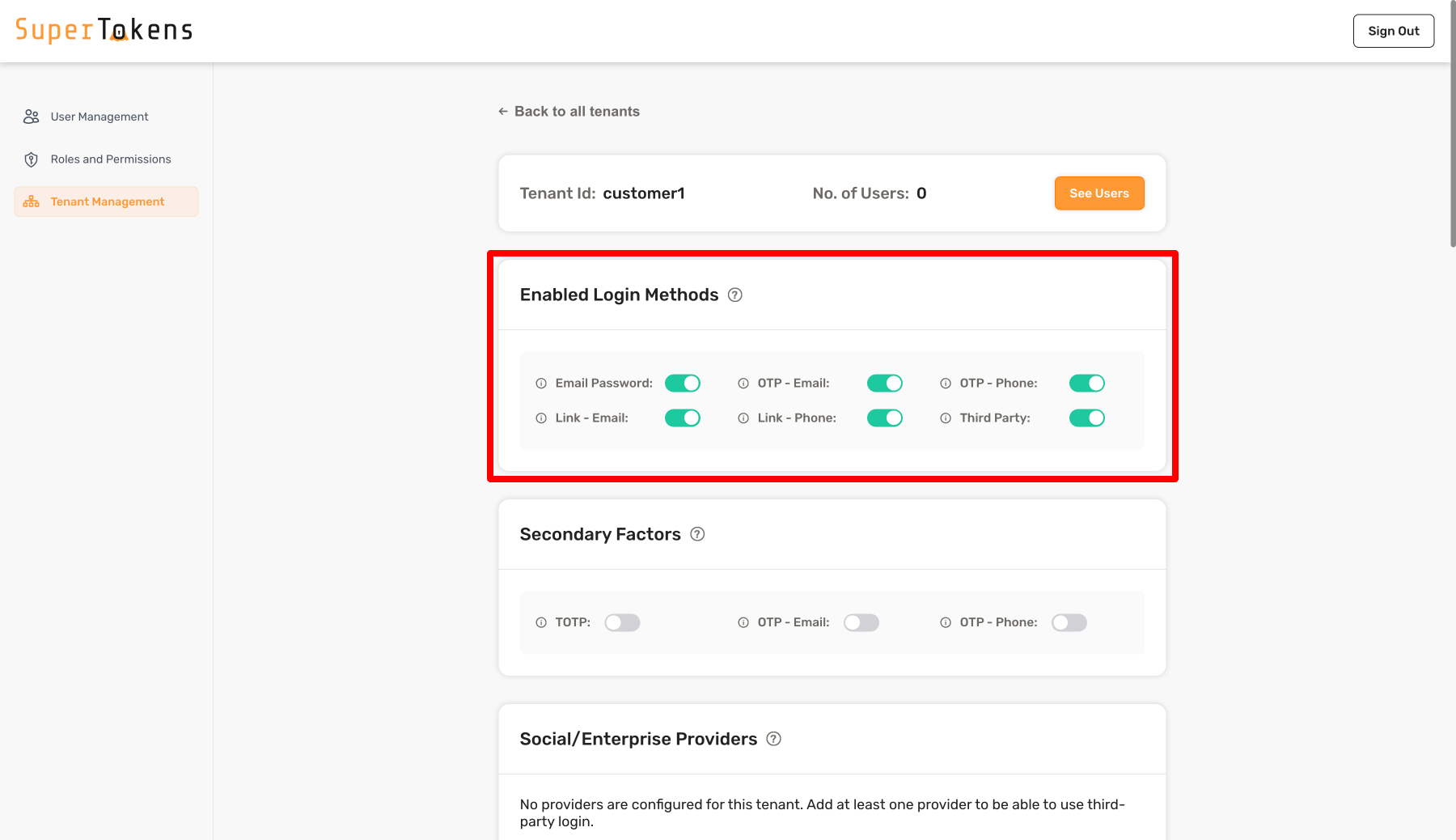
Once you create the tenant, turn on the Login Methods as required for the tenant. In the above example, you turn on all the Login Methods.
import Multitenancy from "supertokens-node/recipe/multitenancy";

async function createNewTenant() {
  let resp = await Multitenancy.createOrUpdateTenant("customer1", {
    firstFactors: ["emailpassword", "thirdparty", "otp-email", "otp-phone", "link-phone", "link-email"],
  });

  if (resp.createdNew) {
    // Tenant created successfully
  } else {
    // Existing tenant's config was modified.
  }
}
import (
"github.com/supertokens/supertokens-golang/recipe/multitenancy"
"github.com/supertokens/supertokens-golang/recipe/multitenancy/multitenancymodels"
)
func main() {
tenantId := "customer1"
emailPasswordEnabled := true
thirdPartyEnabled := true
passwordlessEnabled := true
resp, err := multitenancy.CreateOrUpdateTenant(tenantId, multitenancymodels.TenantConfig{
EmailPasswordEnabled: &emailPasswordEnabled,
ThirdPartyEnabled: &thirdPartyEnabled,
PasswordlessEnabled: &passwordlessEnabled,
})
if err != nil {
// handle error
}
if resp.OK.CreatedNew {
// new tenant was created
} else {
// existing tenant's config was modified.
}
}from supertokens_python.recipe.multitenancy.asyncio import create_or_update_tenant
from supertokens_python.recipe.multitenancy.interfaces import TenantConfigCreateOrUpdate
async def some_func():
response = await create_or_update_tenant("customer1", TenantConfigCreateOrUpdate(
first_factors=["emailpassword", "thirdparty", "otp-email", "otp-phone", "link-phone", "link-email"]
))
if response.status != "OK":
print("Handle error")
elif response.created_new:
print("New tenant was created")
else:
print("Existing tenant's config was updated")from supertokens_python.recipe.multitenancy.syncio import create_or_update_tenant
from supertokens_python.recipe.multitenancy.interfaces import TenantConfigCreateOrUpdate
def some_func():
response = create_or_update_tenant("customer1", TenantConfigCreateOrUpdate(
first_factors=["emailpassword", "thirdparty", "otp-email", "otp-phone", "link-phone", "link-email"]
))
if response.status != "OK":
print("Handle error")
elif response.created_new:
print("New tenant was created")
else:
print("Existing tenant's config was updated")curl --location --request PUT 'http://localhost:3567/recipe/multitenancy/tenant/v2' \
--header 'api-key: YOUR_API_KEY' \
--header 'Content-Type: application/json' \
--data-raw '{
"tenantId": "customer1",
"firstFactors": ["emailpassword", "thirdparty", "otp-email", "otp-phone", "link-email", "link-phone"]
}'The snippet creates a new tenant with the id "customer1".
It enables the email password, third party and passwordless login methods for this tenant.
You can also disable any of these by not including them in the firstFactors input.
If firstFactors is not specified, by default, the system does not enable any of the login methods.
If you set firstFactors to null the SDK uses any of the login methods.
The built-in Factor IDs available for firstFactors include:
| Authentication Type | Factor ID |
|---|---|
| Email password auth | emailpassword |
| Social login / enterprise SSO auth | thirdparty |
| Passwordless - Email OTP | otp-email |
| Passwordless - SMS OTP | otp-phone |
| Passwordless - Email magic link | link-email |
| Passwordless - SMS magic link | link-phone |
The code snippet creates a new tenant with the id "customer1".
It enables the email password, third party and passwordless login methods for this tenant.
You can also disable any of these by setting the corresponding field to false.
The code snippet creates a new tenant with the id "customer1".
It enables the email password, third party and passwordless login methods for this tenant.
You can also disable any of these by setting the corresponding field to false.
The request includes the appId for which you need to create a new tenant.
If you are using the default ("public") app, you can omit the /appid-<APP_ID> part of the URL.
The snippet creates a new tenant with the id "customer1".
It enables the email password, third party and passwordless login methods for this tenant.
You can also disable any of these by not including them in the firstFactors input.
If firstFactors is not specified, by default, the system does not enable any of the login methods.
The built-in Factor IDs available for firstFactors include:
| Authentication Type | Factor ID |
|---|---|
| Email password auth | emailpassword |
| Social login / enterprise SSO auth | thirdparty |
| Passwordless - Email OTP | otp-email |
| Passwordless - SMS OTP | otp-phone |
| Passwordless - Email magic link | link-email |
| Passwordless - SMS magic link | link-phone |
Update a tenant
You can also configure a tenant to have different configurations per the core’s config.yaml or docker environment variables. Below is how you can specify the configuration, when creating or modifying a tenant:
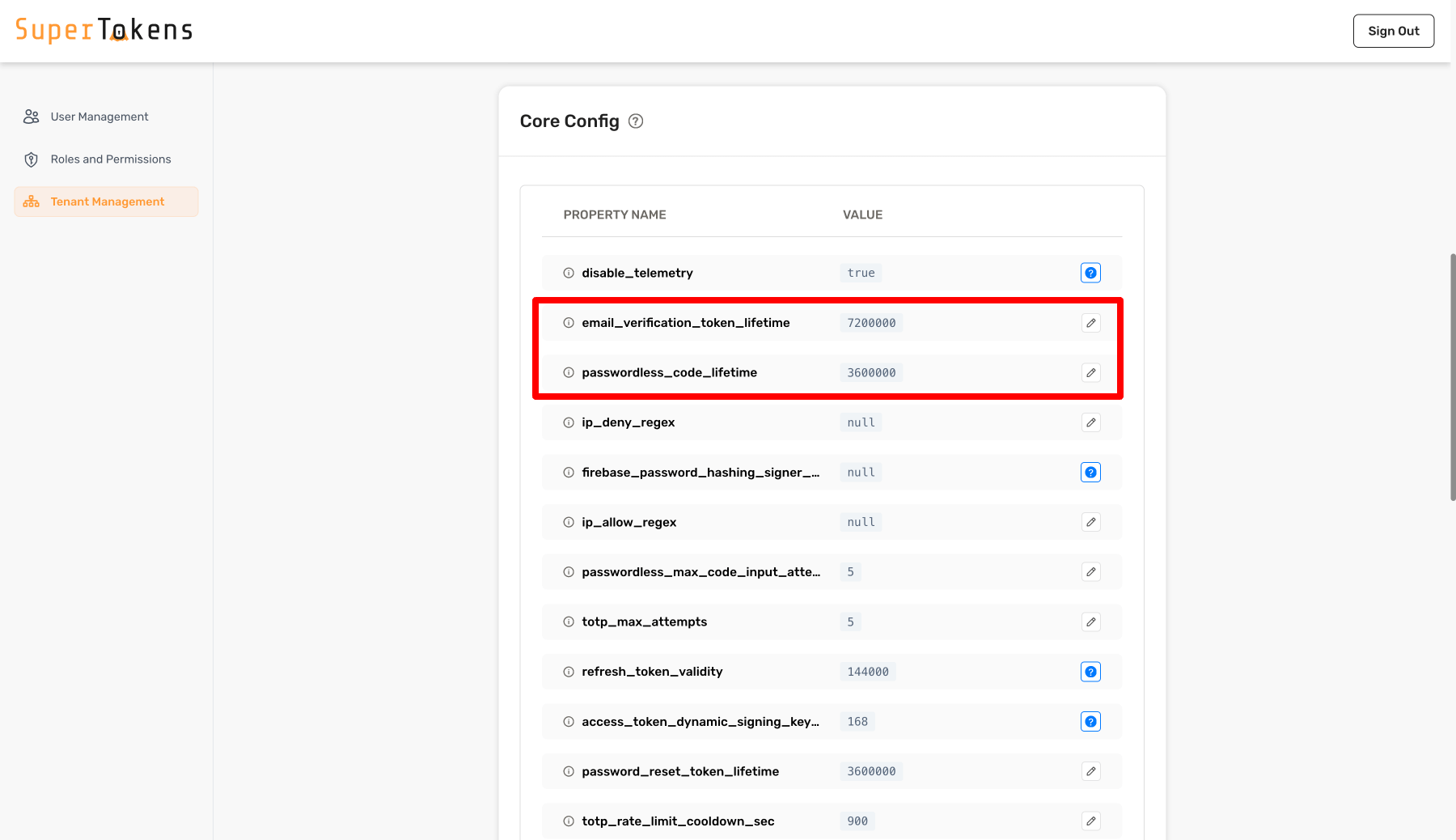
In the above example, the system assigns different values for certain configurations for customer1 tenant.
All other configurations inherit from the base configuration.
You can edit the values by clicking on the pencil icon and then specifying a new value.
import Multitenancy from "supertokens-node/recipe/multitenancy";

async function createNewTenant() {
  let resp = await Multitenancy.createOrUpdateTenant("customer1", {
    coreConfig: {
      email_verification_token_lifetime: 7200000,
      password_reset_token_lifetime: 3600000,
      postgresql_connection_uri: "postgresql://localhost:5432/db2",
    },
  });

  if (resp.createdNew) {
    // new tenant was created
  } else {
    // existing tenant's config was modified.
  }
}
import (
"github.com/supertokens/supertokens-golang/recipe/multitenancy"
"github.com/supertokens/supertokens-golang/recipe/multitenancy/multitenancymodels"
)
func main() {
tenantId := "customer1"
resp, err := multitenancy.CreateOrUpdateTenant(tenantId, multitenancymodels.TenantConfig{
CoreConfig: map[string]interface{}{
"email_verification_token_lifetime": 7200000,
"password_reset_token_lifetime": 3600000,
"postgresql_connection_uri": "postgresql://localhost:5432/db2",
},
})
if err != nil {
// handle error
}
if resp.OK.CreatedNew {
// new tenant was created
} else {
// existing tenant's config was modified.
}
}from supertokens_python.recipe.multitenancy.asyncio import create_or_update_tenant
from supertokens_python.recipe.multitenancy.interfaces import TenantConfigCreateOrUpdate
async def some_func():
tenant_id = "customer1"
result = await create_or_update_tenant(tenant_id, TenantConfigCreateOrUpdate(
core_config={
"email_verification_token_lifetime": 7200000,
"password_reset_token_lifetime": 3600000,
"postgresql_connection_uri": "postgresql://localhost:5432/db2",
},
))
if result.status != "OK":
print("handle error")
elif result.created_new:
print("new tenant created")
else:
print("existing tenant's config was modified.")from supertokens_python.recipe.multitenancy.syncio import create_or_update_tenant
from supertokens_python.recipe.multitenancy.interfaces import TenantConfigCreateOrUpdate
tenant_id = "customer1"
result = create_or_update_tenant(tenant_id, TenantConfigCreateOrUpdate(
core_config={
"email_verification_token_lifetime": 7200000,
"password_reset_token_lifetime": 3600000,
"postgresql_connection_uri": "postgresql://localhost:5432/db2",
},
))
if result.status != "OK":
print("handle error")
elif result.created_new:
print("new tenant created")
else:
print("existing tenant's config was modified.")curl --location --request PUT 'http://localhost:3567/recipe/multitenancy/tenant/v2' \
--header 'api-key: YOUR_API_KEY' \
--header 'Content-Type: application/json' \
--data-raw '{
"tenantId": "customer1",
"coreConfig": {
"email_verification_token_lifetime": 7200000,
"password_reset_token_lifetime": 3600000,
"postgresql_connection_uri": "postgresql://localhost:5432/db2"
}
}'In the above example, the system assigns different values for certain configurations for customer1 tenant.
All other configurations inherit from the base configuration.
Notice the postgresql_connection_uri.
This allows you to achieve data isolation on a tenant level.
This configuration is not required.
If not provided, the database stores the tenant’s information as specified in the core’s configuration.
It is still a different user pool though.
In the above example, the system assigns different values for certain configurations for customer1 tenant.
All other configurations inherit from the base configuration.
Notice the postgresql_connection_uri.
This allows you to achieve data isolation on a tenant level.
This configuration is not required.
If not provided, the database stores the tenant’s information as specified in the core’s configuration.
It is still a different user pool though.
In the above example, the system assigns different values for certain configurations for customer1 tenant.
All other configurations inherit from the base configuration.
Notice the postgresql_connection_uri.
This allows you to achieve data isolation on a tenant level.
This configuration is not required.
If not provided, the database stores the tenant’s information as specified in the core’s configuration.
It is still a different user pool though.
In the above example, the system assigns different values for certain configurations for customer1 tenant.
All other configurations inherit from the base configuration.
Notice the postgresql_connection_uri.
This allows you to achieve data isolation on a tenant level.
This configuration is not required.
If not provided, the database stores the tenant’s information as specified in the core’s configuration.
It is still a different user pool though.
Get tenant details
Once you have set the configs for a specific tenant, you can fetch the tenant info as shown below:
import Multitenancy from "supertokens-node/recipe/multitenancy";

async function getTenant(tenantId: string) {
  let resp = await Multitenancy.getTenant(tenantId);

  if (resp === undefined) {
    // tenant does not exist
  } else {
    let coreConfig = resp.coreConfig;

    let firstFactors = resp.firstFactors;

    let configuredThirdPartyProviders = resp.thirdParty.providers;
  }
}
import (
"fmt"
"github.com/supertokens/supertokens-golang/recipe/multitenancy"
)
func main() {
tenantId := "customer1"
tenant, err := multitenancy.GetTenant(tenantId)
if err != nil {
// handle error
}
if tenant == nil {
// tenant does not exist
} else {
isEmailPasswordLoginEnabled := tenant.EmailPassword.Enabled;
isThirdPartyLoginEnabled := tenant.ThirdParty.Enabled;
isPasswordlessLoginEnabled := tenant.Passwordless.Enabled;
if (isEmailPasswordLoginEnabled) {
// Tenant support email password login
}
if (isThirdPartyLoginEnabled) {
// Tenant support third party login
configuredThirdPartyProviders := tenant.ThirdParty.Providers;
fmt.Println(configuredThirdPartyProviders);
}
if (isPasswordlessLoginEnabled) {
// Tenant support passwordless login
}
}
}from supertokens_python.recipe.multitenancy.asyncio import get_tenant
async def some_func():
tenant = await get_tenant("customer1")
if tenant is None:
print("tenant does not exist")
else:
core_config = tenant.core_config
first_factors = tenant.first_factors
providers = tenant.third_party_providers
print(core_config)
print(first_factors)
print(providers)from supertokens_python.recipe.multitenancy.syncio import get_tenant
tenant = get_tenant("customer1")
if tenant is None:
print("tenant does not exist")
else:
core_config = tenant.core_config
first_factors = tenant.first_factors
providers = tenant.third_party_providers
print(core_config)
print(first_factors)
print(providers)curl --location --request GET 'http://localhost:3567/customer1/recipe/multitenancy/tenant/v2' \
--header 'api-key: YOUR_API_KEY' \
--header 'Content-Type: application/json'Notice that you add customer1 to the path of the request. This tells the core that the tenant you want to get the information about is customer1 (the one created before in this page).
If the input tenant does not exist, you get back a 200 status code with the following JSON:
{ "status": "TENANT_NOT_FOUND_ERROR" }Otherwise you get a 200 status code with the following JSON output:
{
  "status": "OK",
  "thirdParty": {
    "providers": [...]
  },
  "coreConfig": {
	"email_verification_token_lifetime": 7200000,
	"password_reset_token_lifetime": 3600000,
	"postgresql_connection_uri": "postgresql://localhost:5432/db2"
  },
  "tenantId": "customer1",
  "firstFactors": ["emailpassword", "thirdparty", "otp-email", "otp-phone", "link-email", "link-phone"]
}
The returned coreConfig is the same as what you set when creating / updating the tenant. The rest of the core configurations for this tenant inherit from the app’s (or the public tenant) configuration. The public tenant, for the public app inherits its configurations from the config.yaml / docker environment variables values.
List all the tenants of an app
import Multitenancy from "supertokens-node/recipe/multitenancy";

async function listAllTenants() {
  let resp = await Multitenancy.listAllTenants();
  let tenants = resp.tenants;

  tenants.forEach((tenant) => {
    let coreConfig = tenant.coreConfig;

    let firstFactors = tenant.firstFactors;

    let configuredThirdPartyProviders = tenant.thirdParty.providers;
  });
}
import (
"fmt"
"github.com/supertokens/supertokens-golang/recipe/multitenancy"
)
func main() {
resp, err := multitenancy.ListAllTenants()
if err != nil {
// handle error
}
for i := 0; i < len(resp.OK.Tenants); i++ {
currTenant := resp.OK.Tenants[i]
coreConfig := currTenant.CoreConfig;
fmt.Println(coreConfig)
isEmailPasswordLoginEnabled := currTenant.EmailPassword.Enabled;
isThirdPartyLoginEnabled := currTenant.ThirdParty.Enabled;
isPasswordlessLoginEnabled := currTenant.Passwordless.Enabled;
configuredThirdPartyProviders := currTenant.ThirdParty.Providers;
if isEmailPasswordLoginEnabled {
// Tenant has email password login enabled
}
if isThirdPartyLoginEnabled {
// Tenant has third party login enabled
fmt.Println(configuredThirdPartyProviders)
}
if isPasswordlessLoginEnabled {
// Tenant has passwordless login enabled
}
}
}from supertokens_python.recipe.multitenancy.asyncio import list_all_tenants
async def some_func():
response = await list_all_tenants()
if response.status != "OK":
print("Handle error")
return
for tenant in response.tenants:
core_configuration = tenant.core_config
first_factors = tenant.first_factors
configured_third_party_providers = tenant.third_party_providers
print(core_configuration)
print(f"First factors: {first_factors}")
print(f"Configured third party providers: {configured_third_party_providers}")from supertokens_python.recipe.multitenancy.syncio import list_all_tenants
def some_func():
response = list_all_tenants()
if response.status != "OK":
print("Handle error")
return
for tenant in response.tenants:
core_config = tenant.core_config
first_factors = tenant.first_factors
configured_third_party_providers = tenant.third_party_providers
print(core_config)
print(f"First factors: {first_factors}")
print(f"Configured third party providers: {configured_third_party_providers}")curl --location --request GET '<CORE_API_ENDPOINT>/recipe/multitenancy/tenant/list/v2' \
--header 'api-key: <YOUR_API_KEY>' \
--header 'Content-Type: application/json'The value of firstFactors can be as follows:
undefined: The core enables all login methods, and any auth recipe initialized in the backend SDK works.[](empty array): The tenant does not enable any login methods.- a non-empty array: The tenant enables only the login methods in the array.
You get the following JSON output:
{
    "status": "OK",
    "tenants": [{
        "tenantId": "customer1",
        "thirdParty": {
            "providers": [...]
        },
        "coreConfig": {...},
        "firstFactors": [...]
    }]
}The value of firstFactors can be as follows:
undefined: The core enables all login methods, and any auth recipe initialized in the backend SDK works.[](empty array): The tenant does not enable any login methods.- a non-empty array: The tenant enables only the login methods in the array.
Add a custom third-party provider to a tenant
If you can’t find a provider in the built-in list, you can add your own custom implementation. This page shows you how to do that on a per tenant basis.
Once you have created a tenant, you want to call the API / function to create a new provider for the tenant as shown below.
Using OAuth endpoints
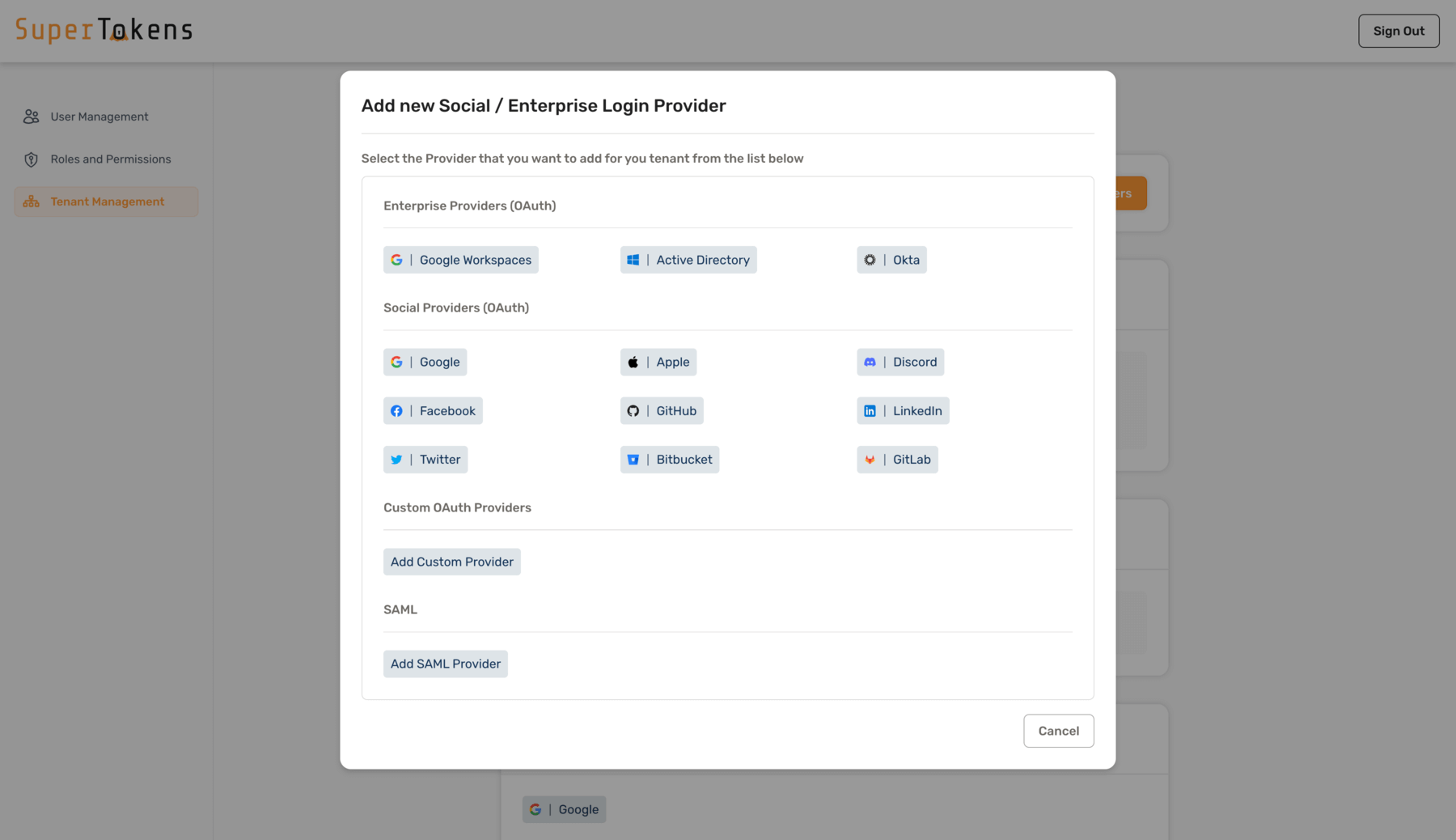
Click on Add new provider in the Social/Enterprise Providers section
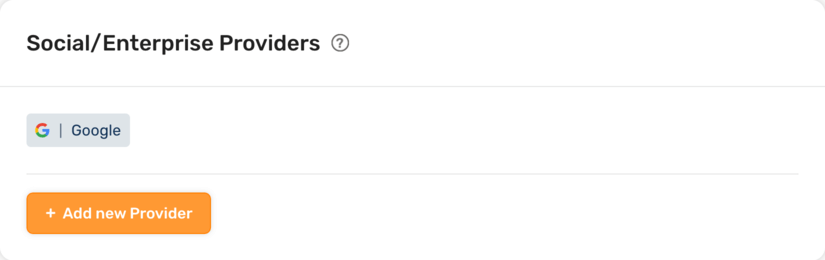
Select Add Custom Provider option
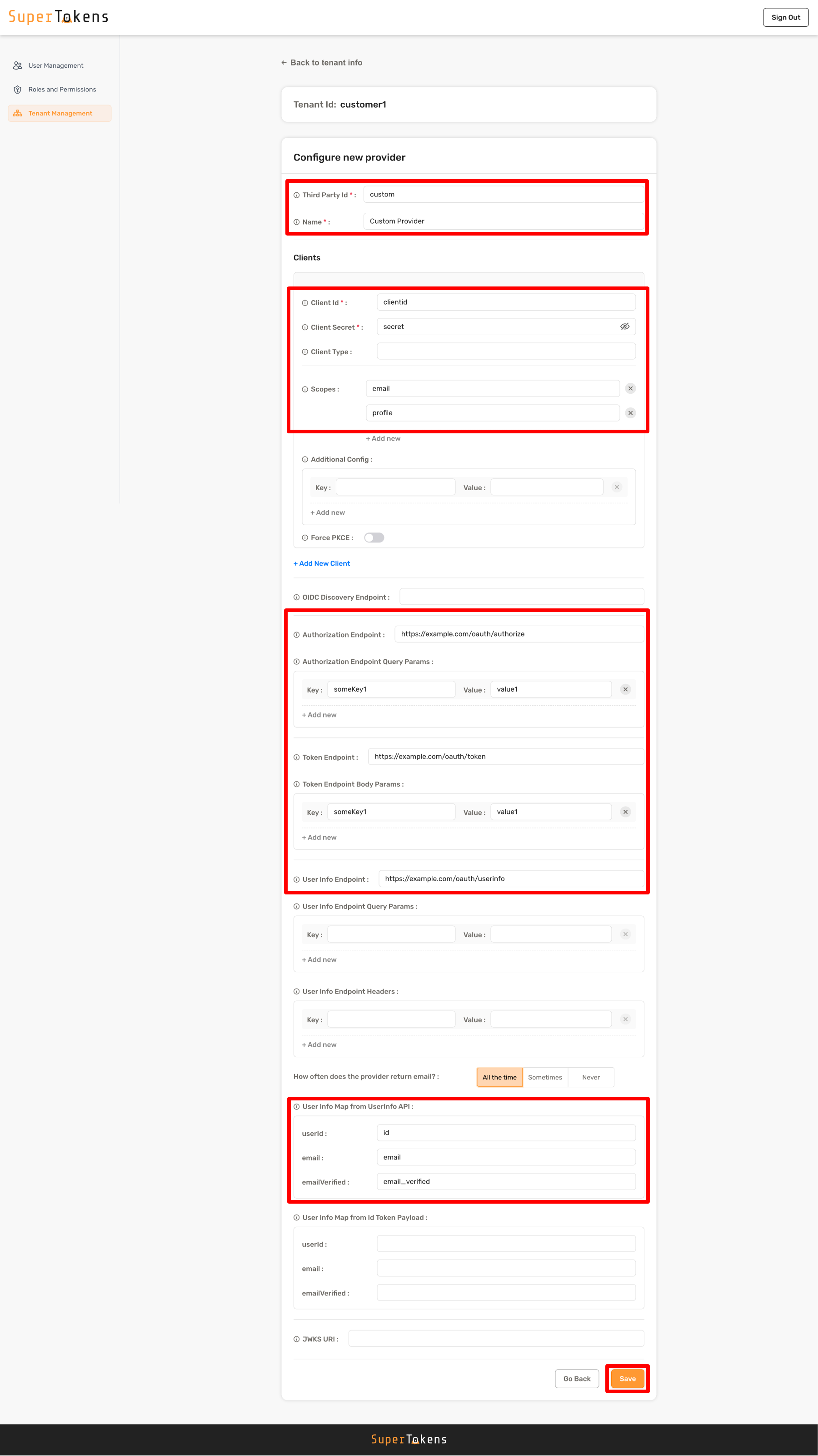
Fill in the details as shown below and click on Save
import Multiteancy from "supertokens-node/recipe/multitenancy";

async function createTenant() {
  let resp = await Multiteancy.createOrUpdateThirdPartyConfig("customer1", {
    thirdPartyId: "custom",
    name: "Custom Provider",
    clients: [
      {
        clientId: "...",
        clientSecret: "...",
        scope: ["email", "profile"],
      },
    ],
    authorizationEndpoint: "https://example.com/oauth/authorize",
    authorizationEndpointQueryParams: {
      // optional
      someKey1: "value1",
      someKey2: null,
    },
    tokenEndpoint: "https://example.com/oauth/token",
    tokenEndpointBodyParams: {
      someKey1: "value1",
    },
    userInfoEndpoint: "https://example.com/oauth/userinfo",
    userInfoMap: {
      fromUserInfoAPI: {
        userId: "id",
        email: "email",
        emailVerified: "email_verified",
      },
    },
  });

  if (resp.createdNew) {
    // custom provider added to tenant
  } else {
    // existing custom provider config overwritten for tenant
  }
}
import (
"github.com/supertokens/supertokens-golang/recipe/multitenancy"
"github.com/supertokens/supertokens-golang/recipe/thirdparty/tpmodels"
)
func main() {
tenantId := "..."
resp, err := multitenancy.CreateOrUpdateThirdPartyConfig(tenantId, tpmodels.ProviderConfig{
ThirdPartyId: "custom",
Name: "Custom Provider",
Clients: []tpmodels.ProviderClientConfig{
{
ClientID: "...",
ClientSecret: "...",
Scope: []string{"email", "profile"},
},
},
AuthorizationEndpoint: "https://example.com/oauth/authorize",
AuthorizationEndpointQueryParams: map[string]interface{}{ // optional
"someKey1": "value1",
"someKey2": nil,
},
TokenEndpoint: "https://example.com/oauth/token",
TokenEndpointBodyParams: map[string]interface{}{ // optional
"someKey1": "value1",
},
UserInfoEndpoint: "https://example.com/oauth/userinfo",
UserInfoMap: tpmodels.TypeUserInfoMap{
FromUserInfoAPI: struct{UserId string "json:\"userId,omitempty\""; Email string "json:\"email,omitempty\""; EmailVerified string "json:\"emailVerified,omitempty\""} {
UserId: "id",
Email: "email",
EmailVerified: "email_verified",
},
},
}, nil)
if err != nil {
// handle error
}
if resp.OK.CreatedNew {
// Custom provider added to tenant
} else {
// Existing custom provider config overwritten for tenant
}
}from supertokens_python.recipe.multitenancy.asyncio import create_or_update_third_party_config
from supertokens_python.recipe.thirdparty.provider import ProviderConfig, ProviderClientConfig, UserInfoMap, UserFields
async def some_func():
tenant_id = "..."
result = await create_or_update_third_party_config(tenant_id, ProviderConfig(
third_party_id="custom",
name="Custom Provider",
clients=[
ProviderClientConfig(
client_id="...",
client_secret="...",
scope=["email", "profile"],
),
],
authorization_endpoint="https://example.com/oauth/authorize",
authorization_endpoint_query_params={
"someKey1": "value1",
"someKey2": None,
},
token_endpoint="https://example.com/oauth/token",
token_endpoint_body_params={
"someKey1": "value1",
},
user_info_endpoint="https://example.com/oauth/userinfo",
user_info_map=UserInfoMap(
from_user_info_api=UserFields(
user_id="id",
email="email",
email_verified="email_verified",
),
from_id_token_payload=UserFields(),
),
))
if result.status != "OK":
print("handle error")
elif result.created_new:
print("Custom provider added to tenant")
else:
print("Existing custom provider config overwritten for tenant")from supertokens_python.recipe.multitenancy.syncio import create_or_update_third_party_config
from supertokens_python.recipe.thirdparty.provider import ProviderConfig, ProviderClientConfig, UserInfoMap, UserFields
tenant_id = "..."
result = create_or_update_third_party_config(tenant_id, ProviderConfig(
third_party_id="custom",
name="Custom Provider",
clients=[
ProviderClientConfig(
client_id="...",
client_secret="...",
scope=["email", "profile"],
),
],
authorization_endpoint="https://example.com/oauth/authorize",
authorization_endpoint_query_params={
"someKey1": "value1",
"someKey2": None,
},
token_endpoint="https://example.com/oauth/token",
token_endpoint_body_params={
"someKey1": "value1",
},
user_info_endpoint="https://example.com/oauth/userinfo",
user_info_map=UserInfoMap(
from_user_info_api=UserFields(
user_id="id",
email="email",
email_verified="email_verified",
),
from_id_token_payload=UserFields(),
),
))
if result.status != "OK":
print("handle error")
elif result.created_new:
print("Custom provider added to tenant")
else:
print("Existing custom provider config overwritten for tenant")curl --location --request PUT '<CORE_API_ENDPOINT>/<TENANT_ID>/recipe/multitenancy/config/thirdparty' \
--header 'api-key: <YOUR_API_KEY>' \
--header 'Content-Type: application/json' \
--data-raw '{
"config": {
"thirdPartyId": "custom",
"name": "Custom provider",
"clients": [{
"clientId": "...",
"clientSecret": "...",
"scope": ["email", "profile"]
}],
"authorizationEndpoint": "https://example.com/oauth/authorize",
"authorizationEndpointQueryParams": {
"someKey1": "value1",
"someKey2": "value2"
},
"tokenEndpoint": "https://example.com/oauth/token",
"tokenEndpointBodyParams": {
"someKey1": "value1"
},
"userInfoEndpoint": "https://example.com/oauth/userinfo",
"userInfoMap": {
"fromUserInfoAPI": {
"userId": "id",
"email": "email",
"emailVerified": "email_verified"
}
}
}
}'You can see all the options in the CDI documentation.
| Field | Description | Example |
|---|---|---|
tenantId |
Unique ID that identifies the tenant. If not specified, defaults to "public" |
"customer1" |
thirdPartyId |
Unique ID for identifying the provider | "google" |
name |
Display name used for the login button UI | "XYZ" → displays “Login using XYZ” |
clients |
Array of client credentials/settings. Can contain multiple items for different client types (web/mobile) | Contains clientId, clientSecret, and optional clientType |
authorizationEndpoint |
URL for user login | "https://accounts.google.com/o/oauth2/v2/auth" |
authorizationEndpointQueryParams |
Optional configuration to modify query params | |
tokenEndpoint |
API endpoint for exchanging Authorization Code | "https://oauth2.googleapis.com/token" |
tokenEndpointBodyParams |
Optional configuration to modify request body | |
userInfoEndpoint |
API endpoint that provides user information | "https://www.googleapis.com/oauth2/v1/userinfo" |
userInfoMap |
Maps provider’s JSON response to user info fields. Use dot notation to map nested fields: user.id |
{ userId: "id", email: "email", emailVerified: "email_verified" } |
Using OpenID Connect endpoints
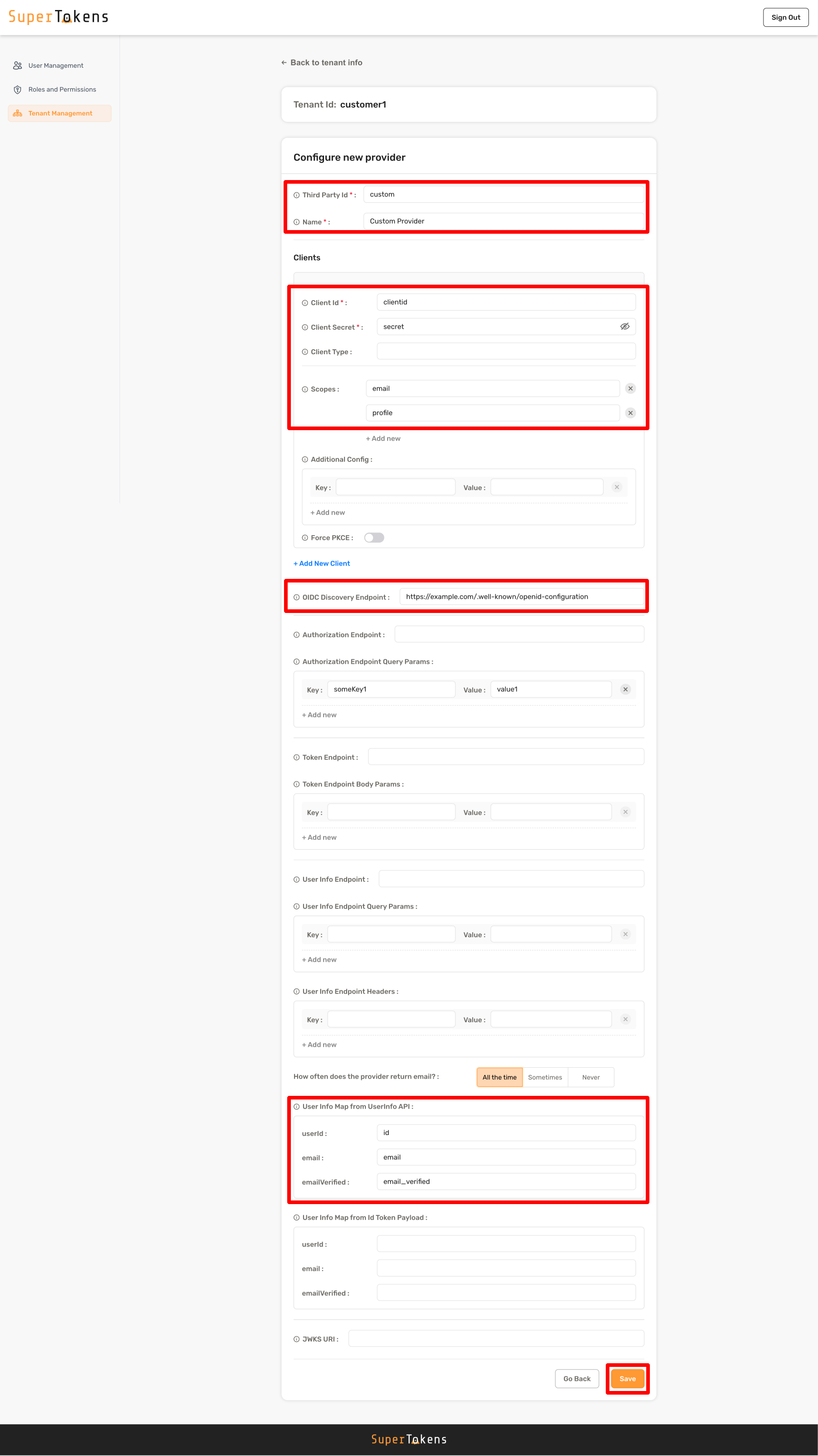
If the provider is Open ID Connect (OIDC) compatible, you can provide a URL for the OIDCDiscoverEndpoint configuration.
The backend SDK automatically discovers authorization endpoint, token endpoint and the user info endpoint by querying the <OIDCDiscoverEndpoint>/.well-known/openid-configuration.
Click on Add new provider in the Social/Enterprise Providers section
Select Add Custom Provider option
Fill in the details as shown below and click on Save
import Multiteancy from "supertokens-node/recipe/multitenancy";

async function createTenant() {
  let resp = await Multiteancy.createOrUpdateThirdPartyConfig("customer1", {
    thirdPartyId: "custom",
    name: "Custom Provider",
    clients: [
      {
        clientId: "...",
        clientSecret: "...",
        scope: ["email", "profile"],
      },
    ],
    oidcDiscoveryEndpoint: "https://example.com/.well-known/openid-configuration",
    authorizationEndpointQueryParams: {
      // optional
      someKey1: "value1",
      someKey2: null,
    },
    userInfoMap: {
      fromIdTokenPayload: {
        userId: "id",
        email: "email",
        emailVerified: "email_verified",
      },
    },
  });

  if (resp.createdNew) {
    // custom provider added to tenant
  } else {
    // existing custom provider config overwritten for tenant
  }
}
import (
"github.com/supertokens/supertokens-golang/recipe/multitenancy"
"github.com/supertokens/supertokens-golang/recipe/thirdparty/tpmodels"
)
func main() {
tenantId := "..."
resp, err := multitenancy.CreateOrUpdateThirdPartyConfig(tenantId, tpmodels.ProviderConfig{
ThirdPartyId: "custom",
Name: "Custom provider",
Clients: []tpmodels.ProviderClientConfig{
{
ClientID: "...",
ClientSecret: "...",
Scope: []string{"profile", "email"},
},
},
OIDCDiscoveryEndpoint: "https://example.com/.well-known/openid-configuration",
AuthorizationEndpointQueryParams: map[string]interface{}{ // optional
"someKey1": "value1",
"someKey2": nil,
},
UserInfoMap: tpmodels.TypeUserInfoMap{
FromIdTokenPayload: struct{UserId string "json:\"userId,omitempty\""; Email string "json:\"email,omitempty\""; EmailVerified string "json:\"emailVerified,omitempty\""} {
UserId: "id",
Email: "email",
EmailVerified: "email_verified",
},
},
}, nil)
if err != nil {
// handle error
}
if resp.OK.CreatedNew {
// Custom provider added to tenant
} else {
// Existing custom provider config overwritten for tenant
}
}from supertokens_python.recipe.multitenancy.asyncio import create_or_update_third_party_config
from supertokens_python.recipe.thirdparty.provider import ProviderConfig, ProviderClientConfig, UserInfoMap, UserFields
async def some_func():
tenant_id = "..."
result = await create_or_update_third_party_config(tenant_id, ProviderConfig(
third_party_id="custom",
name="Custom Provider",
clients=[
ProviderClientConfig(
client_id="...",
client_secret="...",
scope=["email", "profile"],
),
],
oidc_discovery_endpoint="https://example.com/.well-known/openid-configuration",
authorization_endpoint_query_params={
"someKey1": "value1",
"someKey2": None,
},
user_info_map=UserInfoMap(
from_user_info_api=UserFields(),
from_id_token_payload=UserFields(
user_id="id",
email="email",
email_verified="email_verified",
),
),
))
if result.status != "OK":
print("handle error")
elif result.created_new:
print("Custom provider added to tenant")
else:
print("Existing custom provider config overwritten for tenant")curl --location --request PUT '<CORE_API_ENDPOINT>/<TENANT_ID>/recipe/multitenancy/config/thirdparty' \
--header 'api-key: <YOUR_API_KEY>' \
--header 'Content-Type: application/json' \
--data-raw '{
"config": {
"thirdPartyId": "custom",
"name": "Custom provider",
"clients": [{
"clientId": "...",
"clientSecret": "...",
"scope": ["email", "profile"]
}],
"oidcDiscoveryEndpoint": "https://example.com/.well-known/openid-configuration",
"authorizationEndpointQueryParams": {
"someKey1": "value1",
"someKey2": "value2"
},
"userInfoMap": {
"fromIdTokenPayload": {
"userId": "id",
"email": "email",
"emailVerified": "email_verified"
}
}
}
}'You can see all the options in the CDI documentation.
| Field | Description |
|---|---|
tenantId |
Unique ID that identifies the tenant. If not specified, defaults to "public" |
thirdPartyId, name, clients |
Configuration values similar to OAuth endpoints method |
userInfoMap.fromIdTokenPayload |
Maps user info from the ID token payload |
userInfoMap.fromUserInfoAPI |
Optional mapping from user info API. You can combine it with ID token payload mapping |
Add a user to a tenant
When a user creates an account, they receive a tenantId to sign up. This means that the user can only log in to that tenant. SuperTokens allows you to assign a user ID to multiple tenants. This is possible as long as that user’s email or phone number is unique for that login method, for each of the new tenants. Once associated with multiple tenants, that user can log in to each of the tenants they have access to.
For example, if a user signs up with email password login in the public tenant with email user@example.com, they can join another tenant (t1 for example). This is possible as long as t1 does not already have an email password user with the same email (that is user@example.com).
To associate a user with a tenant, you can call the following API:
import Multitenancy from "supertokens-node/recipe/multitenancy";
import { RecipeUserId } from "supertokens-node";

async function addUserToTenant(recipeUserId: RecipeUserId, tenantId: string) {
  let resp = await Multitenancy.associateUserToTenant(tenantId, recipeUserId);

  if (resp.status === "OK") {
    // User is now associated with tenant
  } else if (resp.status === "UNKNOWN_USER_ID_ERROR") {
    // The provided user ID was not one that signed up using one of SuperTokens' auth recipes.
  } else if (resp.status === "EMAIL_ALREADY_EXISTS_ERROR") {
    // This means that the input user is one of  passwordless or email password logins, and the new tenant already has a user with the same email for that login method.
  } else if (resp.status === "PHONE_NUMBER_ALREADY_EXISTS_ERROR") {
    // This means that the input user is a passwordless user and the new tenant already has a user with the same phone number, for passwordless login.
  } else if (resp.status === "ASSOCIATION_NOT_ALLOWED_ERROR") {
    // This can happen if using account linking along with multi tenancy. One example of when this
    // happens if if the target tenant has a primary user with the same email / phone numbers
    // as the current user.
  } else {
    // status is THIRD_PARTY_USER_ALREADY_EXISTS_ERROR
    // This means that the input user had already previously signed in with the same third party provider (e.g. Google) for the new tenant.
  }
}
import (
"github.com/supertokens/supertokens-golang/recipe/multitenancy"
)
func main() {
tenantId := "customer1"
userID := "user1"
resp, err := multitenancy.AssociateUserToTenant(tenantId, userID)
if err != nil {
// handle error
}
if resp.OK != nil {
// User is now associated with tenant
} else if resp.UnknownUserIdError != nil {
// The provided user ID was not one that signed up using one of SuperTokens' auth recipes.
} else if resp.EmailAlreadyExistsError != nil {
// This means that the input user is one of passwordless or email password logins, and the new tenant already has a user with the same email for that login method.
} else if resp.PhoneNumberAlreadyExistsError != nil {
// This means that the input user is a passwordless user and the new tenant already has a user with the same phone number, for passwordless login.
} else {
// status is ThirdPartyUserAlreadyExistsError
// This means that the input user had already previously signed in with the same third party provider (e.g. Google) for the new tenant.
}
}from supertokens_python.recipe.multitenancy.asyncio import associate_user_to_tenant
from supertokens_python.recipe.multitenancy.interfaces import AssociateUserToTenantUnknownUserIdError, AssociateUserToTenantEmailAlreadyExistsError, AssociateUserToTenantPhoneNumberAlreadyExistsError, AssociateUserToTenantNotAllowedError, AssociateUserToTenantOkResult
from supertokens_python.types import RecipeUserId
async def some_func():
response = await associate_user_to_tenant("customer1", RecipeUserId("user1"))
if isinstance(response, AssociateUserToTenantOkResult):
print("User is now associated with tenant")
elif isinstance(response, AssociateUserToTenantUnknownUserIdError):
print("The provided user ID was not one that signed up using one of SuperTokens' auth recipes.")
elif isinstance(response, AssociateUserToTenantEmailAlreadyExistsError):
print("This means that the input user is one of passwordless or email password logins, and the new tenant already has a user with the same email for that login method.")
elif isinstance(response, AssociateUserToTenantPhoneNumberAlreadyExistsError):
print("This means that the input user is a passwordless user and the new tenant already has a user with the same phone number, for passwordless login.")
elif isinstance(response, AssociateUserToTenantNotAllowedError):
# This can happen if using account linking along with multi tenancy. One example of when this
# happens if if the target tenant has a primary user with the same email / phone numbers
# as the current user.
print("The new tenant does not allow associating users to it.")
else:
print("status is ThirdPartyUserAlreadyExistsError")
print("This means that the input user had already previously signed in with the same third party provider (e.g. Google) for the new tenant.")from supertokens_python.recipe.multitenancy.syncio import associate_user_to_tenant
from supertokens_python.recipe.multitenancy.interfaces import AssociateUserToTenantUnknownUserIdError, AssociateUserToTenantEmailAlreadyExistsError, AssociateUserToTenantPhoneNumberAlreadyExistsError, AssociateUserToTenantNotAllowedError, AssociateUserToTenantOkResult
from supertokens_python.types import RecipeUserId
response = associate_user_to_tenant("customer1", RecipeUserId("user1"))
if isinstance(response, AssociateUserToTenantOkResult):
print("User is now associated with tenant")
elif isinstance(response, AssociateUserToTenantUnknownUserIdError):
print("The provided user ID was not one that signed up using one of SuperTokens' auth recipes.")
elif isinstance(response, AssociateUserToTenantEmailAlreadyExistsError):
print("This means that the input user is one of passwordless or email password logins, and the new tenant already has a user with the same email for that login method.")
elif isinstance(response, AssociateUserToTenantPhoneNumberAlreadyExistsError):
print("This means that the input user is a passwordless user and the new tenant already has a user with the same phone number, for passwordless login.")
elif isinstance(response, AssociateUserToTenantNotAllowedError):
# This can happen if using account linking along with multi tenancy. One example of when this
# happens if if the target tenant has a primary user with the same email / phone numbers
# as the current user.
print("The new tenant does not allow associating users to it.")
else:
print("status is ThirdPartyUserAlreadyExistsError")
print("This means that the input user had already previously signed in with the same third party provider (e.g. Google) for the new tenant.")curl --location --request POST '<CORE_API_ENDPOINT>/<TENANT_ID>/recipe/multitenancy/tenant/user \
--header 'api-key: <YOUR_API_KEY>' \
--header 'Content-Type: application/json' \
--data-raw '{
"recipeUserId": "..."
}'In the above code, recipeUserId is associated with the tenant with ID TENANT_ID. The output of the above API has the following status response:
"OK": User association with tenant was successful"UNKNOWN_USER_ID_ERROR": The provided user ID was not one that signed up using one of SuperTokens’ auth recipes."EMAIL_ALREADY_EXISTS_ERROR": This means that the input user is one of passwordless or email password logins, and the new tenant already has a user with the same email for that login method."PHONE_NUMBER_ALREADY_EXISTS_ERROR": This means that the input user is a passwordless user and the new tenant already has a user with the same phone number, for passwordless login."THIRD_PARTY_USER_ALREADY_EXISTS_ERROR": This means that the input user had already previously signed in with the same third-party provider (for example, Google) for the new tenant.
Remove a user from a tenant
You can even remove a user’s access from a tenant using the API call shown below. In fact, you can remove a user from all tenants that they have access to, and the user and their metadata remain in the system. However, they cannot log in to any tenant. To remove a user from a tenant, call the following API:
import Multitenancy from "supertokens-node/recipe/multitenancy";
import { RecipeUserId } from "supertokens-node";

async function removeUserFromTeannt(recipeUserId: RecipeUserId, tenantId: string) {
  let resp = await Multitenancy.disassociateUserFromTenant(tenantId, recipeUserId);

  if (resp.wasAssociated) {
    // User was removed from tenant
  } else {
    // User was never a part of the tenant anyway
  }
}
import (
"github.com/supertokens/supertokens-golang/recipe/multitenancy"
)
func main() {
tenantId := "customer1"
userID := "user1"
resp, err := multitenancy.DisassociateUserFromTenant(tenantId, userID)
if err != nil {
// handle error
}
if resp.OK.WasAssociated {
// User was removed from tenant
} else {
// User was never a part of the tenant anyway
}
}from supertokens_python.recipe.multitenancy.asyncio import disassociate_user_from_tenant
from supertokens_python.types import RecipeUserId
async def some_func():
response = await disassociate_user_from_tenant("customer1", RecipeUserId("user1"))
if response.was_associated:
print("User was removed from tenant")
else:
print("User was never a part of the tenant anyway")from supertokens_python.recipe.multitenancy.syncio import disassociate_user_from_tenant
from supertokens_python.types import RecipeUserId
def some_func():
response = disassociate_user_from_tenant("customer1", RecipeUserId("user1"))
if response.was_associated:
print("User was removed from tenant")
else:
print("User was never a part of the tenant anyway")curl --location --request POST '<CORE_API_ENDPOINT>/<TENANT_ID>/recipe/multitenancy/tenant/user/remove \
--header 'api-key: <YOUR_API_KEY>' \
--header 'Content-Type: application/json' \
--data-raw '{
"recipeUserId": "..."
}'